


CashBook - Balance & Expense
3.8475.00 Reviews
App Specs
- Version
- 8.7.3
- Updated On
- License
- Free
- Downloads
- 5,000,000+
- Developer
- Obopay – Payment Wallet for Businesses
- Categories
- Business
- Platform
- Android
Screenshots
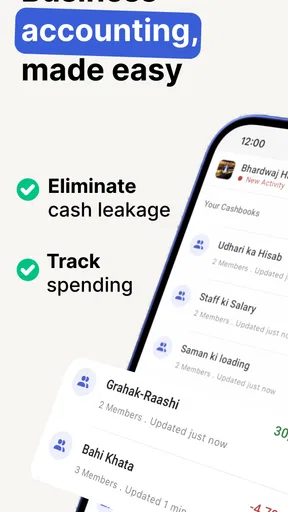


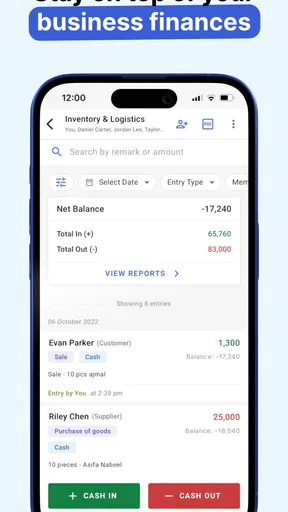

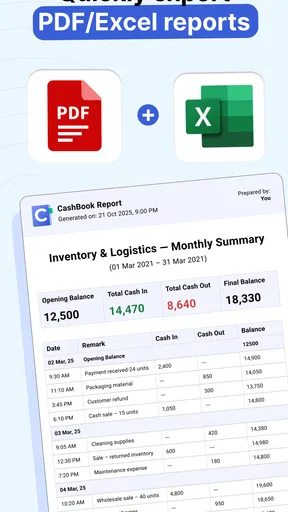
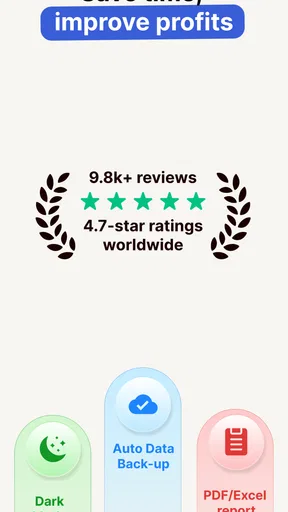
 Analysis by AppCompare
I like the idea behind Cash Book: Expenses & Balance: make day-to-day money tracking simple enough that I’ll actually keep doing it. It is a bookkeeping app in the business category, developed by Obopay – Payment Wallet for Businesses, but its basic appeal is just as clear for someone who wants a more orderly record of cash coming in and going out. It is free to install, with in-app purchases available, so I’d start with the core experience and decide whether it suits my routine before spending anything.
Where a simple ledger earns its keep
The most useful way to approach a cash-book app is as a record you maintain, not a magic window into every account. I would use it to capture transactions as they happen and review the pattern later. That distinction matters: if you expect automatic, bank-connected tracking, a manual ledger may feel like extra work. If you want to know what you personally recorded, a focused bookkeeping tool can be easier to understand than a crowded finance dashboard.
For a small shop owner, the practical benefit is having a place to note a customer payment or a supply purchase while the details are still fresh. For a freelancer, it can help separate project-related spending from ordinary personal purchases. A household user could also keep a simple log of shared costs. In each case, the app is most valuable when the entries are consistent; a forgotten cash expense can make the later balance less useful.
A routine that makes the numbers more useful
I’d suggest choosing a few categories that reflect real decisions rather than trying to classify every transaction with excessive precision. A shop might distinguish stock, transport, and utilities; a freelancer might separate equipment, subscriptions, and travel. The point is not to build a perfect accounting system inside a phone. It is to make the next review understandable enough that you can spot a change and act on it.
A realistic routine could be a market seller entering sales and small purchases between customers, then checking the day’s entries before closing. That quick review can catch a missed cost while the receipt or memory is still available. If the same review is postponed until the end of the week, small cash purchases are easier to overlook. I’d treat a brief daily habit as more important than elaborate categories or a complicated budget plan.
What it does well—and what it asks of you
The focused ledger approach is a strength when I want a clear record without the learning curve of full accounting software. Compared with a spreadsheet, a dedicated app can make recording and checking entries feel more convenient on a phone. Compared with a bank-linked personal finance app, a manually maintained book gives me more control over what I record, but it also depends on me to enter transactions and keep them current.
That trade-off is especially important for businesses. A basic cash record can help with everyday awareness, but it should not automatically be treated as a replacement for formal accounts, tax records, invoices, or professional bookkeeping. If your work involves several staff members, complicated inventory, detailed reporting, or a need to reconcile transactions across accounts, a fuller business accounting package may be the better fit. I would use a simple ledger for visibility, not assume it covers every compliance or operational need.
Worth Reading Before You Choose

EA SPORTS FC Mobile 26 Is a Bigger Football Game, but It Takes Time

Flipboard Shows What News Apps Must Do Beyond the Feed

Switching to Android Auto Means Rethinking Your Driving Routine

Google Calendar Makes a Crowded Week Easier to Manage

Ludo King Makes the Most of the Minutes Between Plans

Baby Panda World Brings Quick Play to Modern Phones, but Its Game Library Feels Busy
Before relying on any money-tracking app, I’d also check how its current version handles the workflows I care about and whether the available purchase options are relevant to me. The app is free, while in-app purchases range from a small amount to a substantially higher one. That makes it sensible to explore the basic experience first and avoid paying for anything until I understand what it adds to my own routine.
Who should consider it
I see the strongest fit for someone who wants to record income and spending in a straightforward way and is willing to do that recording themselves. A sole trader with modest daily cash activity, a side-business owner, or a person trying to understand recurring household expenses may appreciate a dedicated place for the numbers. The app has an Everyone content rating, and its current version is 7.15.3; its listed minimum operating-system requirement is 7.0.
It is less compelling for someone who already keeps accurate records in a spreadsheet and rarely needs to enter transactions on the move. It may also frustrate anyone who expects automatic imports, advanced forecasting, or a complete accounting workflow. Those are not small differences in preference: they change how much manual effort the app requires and whether a basic ledger is enough for the job.
Its audience is sizeable, with more than a million installs, and the average rating is 3.8 from around 203,000 ratings. I read that as a reason to set realistic expectations rather than as proof that it will suit every business. The app was released on August 2, 2020, and its standing can change as it develops, so I’d judge it by whether its current interface and available tools match the way I actually handle money.
Questions worth settling before you commit
Will it replace a spreadsheet? For quick entries and convenient reviews on a phone, it may be a more approachable option. For custom formulas, tailored reports, or a workflow shared across several people, a spreadsheet or dedicated accounting service may be more flexible. I would choose based on the next task I need to complete, not on the assumption that one tool must replace every other record-keeping method.
Is it suitable for business bookkeeping? It can serve as a practical day-to-day record for a simple operation, but I would not rely on a basic cash book alone for complex accounting or statutory obligations. Can it help with spending discipline? A clear record can make patterns easier to notice, but it cannot prevent overspending by itself; the value comes from reviewing entries and changing a habit when the numbers point to one.
How much effort does it take? The answer depends largely on how often you enter transactions. Logging them close to the moment they happen is less burdensome than reconstructing a week from memory. And is it worth paying for extras? I’d first establish whether the free experience supports my regular process, then compare any purchase with a specific need rather than buying on the vague hope of better financial control.
My overall view is that Cash Book: Expenses & Balance makes the most sense as a practical, manually maintained record—not as a substitute for every financial tool. I’d recommend trying it if you want a simple way to keep track of everyday business or personal cash activity and are prepared to enter transactions consistently. If your priority is automatic account syncing, shared bookkeeping, or formal business reporting, I’d look at alternatives built for those jobs instead.
Ever found yourself wondering where all your money went at the end of the month? Yeah, me too. I recently stumbled upon the Cash Book: Expenses & Balance app, and let me tell you, it’s been a game-changer for keeping my finances in check.
Getting Started with Cash Book
First things first, downloading the app was a breeze. It’s available on both Android and iOS, so no worries about compatibility. Setting up my account was straightforward. The interface is super user-friendly, making it easy even for those of us who aren’t exactly tech-savvy. You just enter your basic info, and boom, you’re ready to roll.
Features That Stand Out
So, what does Cash Book bring to the table? For starters, the app offers a simple way to record all your expenses. You can categorize them into different sections like groceries, entertainment, and bills, which makes tracking a lot easier. This is a huge help if you’re trying to see where most of your money is going.
Another cool feature is the balance tracker. It gives you a clear view of your available funds versus expenses. Seeing everything laid out helps you make informed decisions about your spending habits. Plus, there’s a neat little feature where you can set monthly budgets. This has been a lifesaver for me, helping to prevent overspending in certain areas.
Visuals and Usability
The design of the app is sleek and modern. It uses a lot of visuals like graphs and charts, which I find incredibly helpful. These visuals provide a quick snapshot of your financial status without having to dive into numbers and spreadsheets. Let’s face it, no one wants to do math after a long day.
Usability-wise, the app is intuitive. Navigating through different screens feels seamless. Whether you’re adding a new expense or checking your balance, everything is just a tap away. The app also supports multi-currency, which is fantastic if you’re someone who travels frequently or deals with international transactions.
Security and Privacy
Of course, when you’re dealing with financial data, security is a top priority. The app uses advanced encryption to protect your information, and you can also set up a passcode or fingerprint lock for added security. I feel pretty confident that my data is safe, which is always a relief.
Why I Recommend It
Why am I singing its praises? Well, for one, it has genuinely helped me become more aware of my spending habits. I’ve been able to save more money each month by cutting down on unnecessary expenses. The app has also made it easier to budget for future goals. Planning a vacation or saving up for a big purchase doesn’t seem so daunting anymore.
If you’re someone who struggles with staying on top of your finances or just wants an easier way to manage your money, I’d highly recommend giving Cash Book: Expenses & Balance a try. It’s simple, effective, and could very well be the tool you need to gain control over your finances.
So, what are you waiting for? Go ahead and download the app, and start your journey to better financial health today!
Pros
- Intuitive user interface for easy navigation.
- Quick setup with minimal initial input.
- Secure data encryption ensures privacy.
- Supports multiple currencies for global use.
- Offline access for uninterrupted tracking.
Cons
- Limited integration with banking apps.
- No sync feature across multiple devices.
- Ads can be intrusive in the free version.
- Customization options are somewhat limited.
- No desktop version available for users.
FAQs for CashBook - Balance & Expense
What features does Cash Book: Expenses & Balance offer?
Cash Book: Expenses & Balance provides a comprehensive set of features for personal finance management. Users can track daily expenses, set budgets, and visualize financial data through graphs. Additionally, the app offers customizable categories, multi-currency support, and secure data backup. These features make it ideal for both personal and small business use.
Is Cash Book: Expenses & Balance secure for managing my financial data?
Yes, Cash Book: Expenses & Balance prioritizes user security. The app includes features like password protection and data encryption to ensure that your financial information remains confidential. Regular updates also enhance security measures, providing users with peace of mind while managing their finances.
Can I use Cash Book: Expenses & Balance on multiple devices?
Cash Book: Expenses & Balance supports multi-device usage through cloud synchronization. This means you can access your financial data on multiple devices, whether Android or iOS, as long as you are logged into the same account. This feature is especially useful for users who need to manage finances on the go.
Does Cash Book: Expenses & Balance support multiple currencies?
Yes, the app supports multiple currencies, making it a versatile tool for users who deal with international transactions. You can easily switch between currencies and track expenses in different regions, which is particularly beneficial for travelers or businesses operating globally.
Are there any in-app purchases or subscriptions required in Cash Book: Expenses & Balance?
Cash Book: Expenses & Balance offers both a free version and a premium version with additional features. The free version is robust, but the premium version, available through a subscription, provides advanced features like ad-free usage, more detailed analytics, and enhanced customization options. Users can choose based on their needs.


